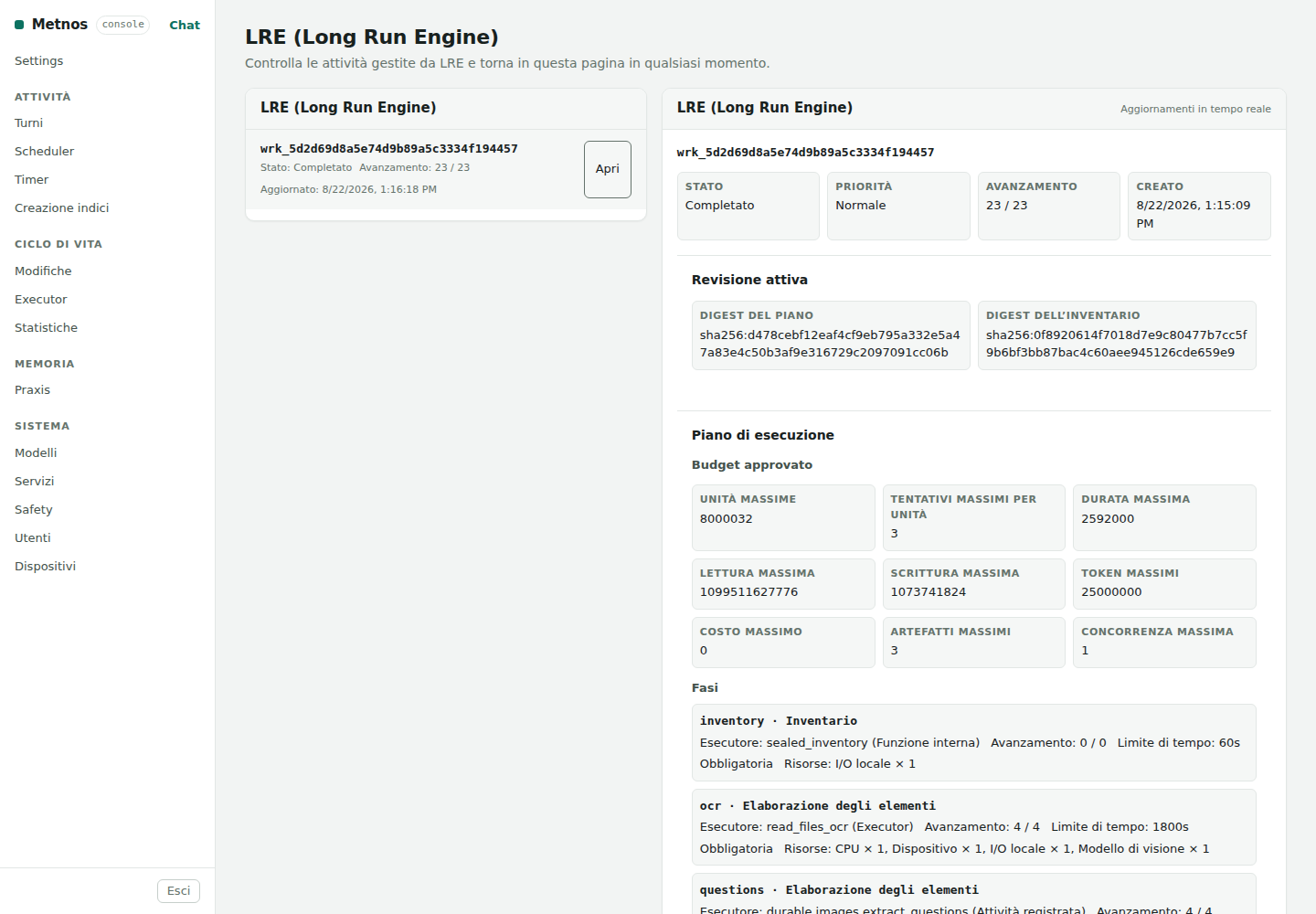
LRE is the universal engine Metnos uses for work that is too long or too broad to remain attached to a single chat turn. The workload is recorded as one or more verifiable units and handed to a supervised execution service. Chat immediately returns a receipt; execution continues independently and can resume after a restart. The user describes the desired outcome: Metnos decides automatically whether to use LRE.
LRE is independent of any particular domain: it governs image processing, mail, databases, and other activities in the same way. For each workload it receives a structured description of what must be done: the sources to use, dependencies between steps, expected results, available resources, limits, timeouts, and failure behaviour. In ordinary cases Metnos derives this description from the executor already selected and the arguments approved for the request. For established compound procedures, it can instead reuse a structure prepared in advance. This is an internal execution choice: users do not configure profiles or need to know the plan's representation.
One example is processing a collection of images from which Metnos produces questions, solutions, notes, and a formula reference. LRE coordinates the different stages and preserves their state. The example illustrates how the engine works but does not define its scope: any compatible ordinary executor can be admitted through the same general mechanism, without code written for a specific domain.
What “universal” means. The engine is domain-independent and does not use a list of profiles as a filter. “Universal” does not mean “unchecked”: LRE automatically accepts every long action it can represent without losing arguments, authority, placement, or recovery guarantees. If it cannot do so, the action is not silently executed through the interactive path; Metnos explains the limitation.
Metnos first prepares the ordinary plan for the turn. Immediately before execution, one central check examines the final plan and the executor's signed contract. In the current automatic path, an action is considered intrinsically long when its declared maximum duration is at least ten minutes. This decision uses structured metadata, not words such as “long”, “in the background”, or “many files”.
A signed contract declaring an interactive effect stays in
the foreground even with a large timeout: it may require user intervention
and does not promise unattended recovery. For example, increasing a browser
search budget does not turn it into an LRE job. An explicitly declared LRE
plan still passes through all admission checks.
| Condition | Metnos decision |
|---|---|
| The plan contains no action above the threshold. | Metnos uses the ordinary interactive path. LRE is not involved. |
| The plan contains one independent long action; its executor is active, signed, and deterministic; its arguments, effect, and destination can be frozen. | Metnos creates the LRE plan during the turn, queues the workload, and returns a receipt. No profile is required. |
| The workload has an integrated LRE plan, such as photo indexing. | Metnos uses that resumable plan, with its steps and model bindings defined before startup. Access checks and resource limits still apply. |
| The long action first requires approval. | Metnos suspends execution and requests approval. After approval, it checks the resumed plan again and, when eligible, hands it to LRE exactly once. |
| The instance switch is disabled. | No new workload enters LRE. Ordinary chat and access to existing workload history continue to work. |
| The workload has no integrated LRE plan and contains dependent actions, unresolved references, a model binding that is not fully frozen, or an ambiguous remote destination. | Metnos states that the long workload was not started. It neither executes the long part through the interactive path nor promises recovery it cannot guarantee. |
| Configuration is invalid or the execution service is unavailable. | Admission fails with a precise explanation. No unit bypasses the check. |
A job whose checks completed without requiring action shows Exempt directly in its row, keeping its dates and detail. This requires explicit confirmation from every final stage: zero errors or an empty list are not enough. For photo indexing, an unchanged archive meets this condition; additions, removals and forced analysis count as changes.
Nightly maintenance distinguishes handing a job to LRE from completing it. If it finds an existing job that needs attention, it retains its reference and records a partial outcome; it neither duplicates the job nor reports it as successful.
The job detail retains items with errors: the total
(nitems) and the count per code, including after a restart. These
are items reported by committed results, not repeated attempts. When there are
many categories, the console shows the twenty most frequent ones, but the total
includes them all. Technical attempt errors remain separate. This summary works
for any workload declaring these outcomes; LRE does not interpret domain files
or codes. The trace remains available while the job history is retained.
The collapsible Attempts with errors (history) section
retains counts and codes of errors recorded during attempts, even when a later
attempt succeeds. It counts attempts, not photos or items: it is not added to
nitems and does not necessarily indicate an ongoing problem. A fully
successful job may therefore have a history of recovered errors without being
declared failed.
Searching the content of photographs uses a persistent index: image descriptions, visual features and, when available, faces and location. Searching a filename or listing a directory does not require this preparation. The mere presence of photos in a directory does not mean their content has already been indexed.
To search, name the archive and describe the content you want. For example: “In the holiday archive, find photos of mountains.” This is a search request: you do not need to issue an index-creation command first.
Yes: at the first content search, Metnos automatically requests indexing if the local archive has no index. No manual start is needed: LRE, the long-running engine, handles preparation. LRE must be enabled, the archive accessible and the models configured. A receipt arrives only after admission; if a check fails, preparation has not started. A repeat request reuses the active workload; an empty result alone does not cause rebuilding. Work runs in the background and large archives may take hours. The outcome stays in the LRE console and is notified through available associated channels. A receipt does not mean the index is ready: wait for completion, then repeat the search. Subsequent searches reuse the index and are generally faster.
These are separate operations. Enrollment registers a person by associating a name with one or more examples of their face in the person registry. Indexing instead analyzes the archive's photos and stores features of the detected faces, without requiring people to be registered first. When you search for a person by name, Metnos compares the current registry with the faces already stored in the index.
You can therefore enroll a person before or after indexing: adding or improving their enrollment does not require rebuilding the photo index. For example, after enrolling Anna you can ask “Find photos of Anna in the holiday archive” even if the archive was indexed earlier. This applies to a valid index that contains face features: enrollment does not analyze new photos or recover faces that were not detected. New or modified photos require an index update, managed by LRE. Images used to enroll a person do not have to belong to the archive being searched.
LRE discovers files in the background, prepares folder context and analyses photos in small groups, in parallel within configured resource limits. Only completed, accepted units and verified outputs survive a worker restart without repetition. Initial discovery is one unit: it establishes the group count and starts over if interrupted before commit; intermediate parts are not a resumable cursor. Uncertain effects or usage may require review before retrying: a restart does not resolve the problem. The local vision model starts when needed and may stop when idle. The new index appears only when its complete generation is published; the previous complete index remains usable. A model or file error remains visible as a problem, not a successful index.
An image that cannot be decoded is not necessarily damaged: the reader may
not support its format or variant. Indexing records a negative outcome for that
photo and continues with the others. Its description starts with
IMAGE_NOT_INDEXED:image_decode_failed, or
IMAGE_NOT_INDEXED:image_format_unreadable when the format is not
recognized. The prefix is fixed, English and outside the translation system;
only the following explanation is translated. No content or vectors are
invented: the photo remains distinct from successfully indexed images.
At completion, the source total must equal indexed photos plus photos not indexed. When all expected batches are complete, history shows the primary state Finished. The badge is orange when negative outcomes exist, while their count and causes remain in the detail. Errors become visible when each batch is committed, without being counted again during merging and publication. Model, authority, accounting and source-integrity errors do not become skippable photos.
Unreadable EXIF GPS coordinates, including fractions with a zero denominator, are omitted: a decodable photograph is still analyzed and indexed. If a managed executor ends with an application exception, it preserves already recorded model call usage and reports the failure. Calls started without a usage report remain uncertain; the correction does not automatically reconstruct counters lost in earlier attempts.
Administrative recovery can admit a continuation with explicit references to committed results: ownership, schema and digest are checked before reading their entries. The original workload and its usage are not rewritten. For a missing report, the continuation can reserve the entire frozen zero-cost local contract allowance and subtract it, together with known consumption, from the original budget. This reservation is not measured usage. Recovery stops without a verifiable bound or enough remaining budget. For photos, committed folder classifications and compatible intermediate checkpoints allow the same generation to continue without repeating successful analyses. This does not automatically retry the blocked revision.
To identify affected photos, search the index using the exact keyword
IMAGE_NOT_INDEXED or either complete prefix. This returns a diagnostic
list of paths and reasons, without semantic analysis or image previews; it does
not start indexing. Ordinary searches exclude these records. A new incremental
refresh retries photos not indexed and reuses compatible valid results; it does
not create an automatic retry loop. Verified intermediate checkpoints can be
reused within the same generation; a new workload does not guarantee reuse of
private checkpoints from a failed generation. Originals and history are not
deleted.
A scheduled LRE job that needs attention remains available for diagnosis and manual recovery. It does not block every later occurrence: a later occurrence may create a new job, while redelivery of the same occurrence does not create a duplicate. If an equivalent job is already queued or running, the new request uses it. A new job does not automatically inherit the earlier job's private checkpoints. After repeated failures, the scheduler delays the next attempt without permanently disabling the task.
Publication verifies the sizes and fingerprints of all five index files, including recovery after interruption: filenames alone do not prove generation integrity. Previous indexes remain readable; a historical generation without these proofs cannot certify a new publication through the fast recovery path.
Building the index requires reading and analysing the photographs. Duration depends on file count and size, the requested analyses, disk speed, models and available resources. Large archives can take a long time, including hours. Any estimate is indicative, not a guaranteed deadline; waiting must not be presented as an absence of matching results.
When processing is actually accepted by LRE, chat returns a receipt and the asynchronous engine continues the work separately: you can use Metnos for other requests or close the page. Status and outcome remain available in the LRE console; completion, completion-with-errors and failure notifications are delivered through Telegram when the owner has a valid association. A workload that was not admitted has not started and will not produce an indexing completion notification. The initial receipt does not mean the index is ready.
After indexing has completed, subsequent searches of the same archive reuse the work already done: they are normally much faster because they do not have to analyse every photo again. Merely issuing a second request is not enough if preparation is still running or has failed. New or modified photos require an index update; an incremental update reuses unchanged photos, while a full rebuild repeats the analysis. None of these operations makes every search instantaneous.
Searching an existing index does not itself start an update on every request. You can ask Metnos to update the archive's index; the scheduled nightly maintenance also submits incremental indexing to LRE. Both an incremental update and a full rebuild can be substantial background jobs, so they use the same resumable processing and resource limits.
An ordinary update does not request a full rebuild or a simulation. For example, “Update the photo index in this folder” keeps the incremental behaviour. Ask explicitly if you want all photos analysed again. The first chat response acknowledges the background job; it does not claim that the index has already been updated.
LRE imposes no arbitrary threshold on the number of items. Each revision does, however, have finite and visible limits consistent with its admitted resources. Plans that expose units and reductions advance in batches instead of accumulating an entire corpus in memory. A monolithic executor remains one unit: LRE can govern its attempt but cannot create internal recovery points. If a budget is exhausted, the workload exposes a structured state rather than pretending that coverage is complete.
Each stage declares where and how it may run. A local executor runs on the server; a remote executor runs on a paired device. Either can be deterministic or use a language or vision model. Placement does not determine intelligence: they are independent properties.
The LRE engine supports all these classes through common interfaces. The current automatic direct path, however, admits deterministic executors only. An executor that uses a model can be admitted when its plan, prompt, model, language, cost, and number of calls have all been frozen by a complete contract, as they are in verified compound plans. This distinction prevents a resumed workload from silently changing model midway through execution.
Independent units may run in parallel, but they do not have private pools of threads or processes. All concurrency passes through the central scheduler, which enforces global, owner, workload, model, and device limits. “Maximum concurrency” is a ceiling, not a promise to use all available capacity at all times.
| Situation | LRE behaviour |
|---|---|
| Worker or computer restarts | State remains in persistent storage; expired leases and unfinished units are reconciled in bounded batches. |
| A recoverable attempt is interrupted | It may run again under at least once semantics, with the delay and attempt number recorded. |
| Two attempts finish for the same unit | Fencing and conditional commit admit one result only for that unit and revision. |
| The same HTTP request is repeated with the same idempotency key | It returns the same workload instead of creating a second revision or corpus. |
| An external effect has an ambiguous outcome | The operation is not retried automatically unless it is idempotent or reconcilable; human attention is required. |
In an automatically generated direct plan, a read-only operation may make up to three attempts. An action that changes data has one automatic attempt: if the service stops after invoking it but before recording the result, LRE requests attention instead of risking a second effect.
LRE automatically retries only declared recoverable errors, within the plan's attempt and effect limits. Exhausting those attempts does not make the cause permanent: the job becomes Needs attention, preserving pending batches and saved results. An unknown cause requires review immediately, without blind retries. After review, Retry grants one new attempt; it does not reset the limit. Unknown usage, missing authority or ambiguous effects can still prevent recovery. Explicit permanent errors and invalid contracts do not become recoverable. History distinguishes the general code and, when available, its approved cause; these counts are attempts, not items.
Before an operation runs, a catalog read failure is confirmed with one additional verified read. If it succeeds, work continues; if it fails again, attention is required. Explicit security refusals remain immediate. This check does not repeat the operation or increase its limits.
The precise guarantee. LRE uses attempts with at least once semantics and admits one valid commit per unit. It can make an observable effect effectively once when the operation is pure, idempotent, or reconcilable. It does not promise universal exactly once semantics across databases, filesystems, providers, and remote devices.
The admitted plan, inventory, and executor or model bindings are frozen in the revision. An incompatible change creates a new revision instead of silently altering half of a running workload. Results may be reused only when dependency digests match. When one source changes, LRE invalidates that unit and its descendants, not independent siblings.
Pausing prevents new units from being acquired while allowing a commit already in flight to finish safely. Cancellation is cooperative and prevents other units from starting. Pause, resume, cancel, and error-resolution commands carry both an expected version and an idempotency key, so redelivering a command does not multiply its effects.
One activation per instance. The switch under Services does not enable one workload. It determines whether the whole Metnos instance may accept new LRE workloads. It is not a per-user setting and should not be changed before each request.
workload_id. In web chat, /admin/lre is a clickable link to the same installation's console, including saved receipts. You do not need to know or select a profile.Settings → System → LRE whenever you want to inspect state, denominator, budget, stages, and events.Disabling the feature prevents new workloads from being submitted but does not delete history or artifacts. Data deletion follows the owner's lifecycle and retention rules. Downloads and views remain scoped to the authorised identity.
The following boundaries distinguish what LRE can guarantee today from what can be added without losing traceability or safety.
| Current limitation | Practical effect | Correct extension path |
|---|---|---|
| Automatic compound plans | The current automatic path queues one independent long action. A plan with several executable steps or unresolved dependencies is not started. | Compile the whole final plan into LRE's typed graph, with explicit references and checks; do not preserve it as an opaque batch. |
| Intelligent executors | The direct path currently excludes language- and vision-model executors without a complete immutable binding. | Freeze prompt, language, model, call limits, tokens, and cost in the same contract, then use the same general interface. |
| Implicit remote destination | An executor that can run only on a device is not queued until the exact device has been resolved. | Name the device in the request or add deterministic, verifiable resolution before admission. |
| Monolithic executor | LRE sees one unit and cannot resume halfway through an undeclared internal loop. | Expose the work as general, identifiable, idempotent units or as a batched reduction; do not add domain-specific cases. |
| External effects are not always repeatable | A write to a service or device may have an unknown outcome after interruption. | Use native idempotency keys or an authoritative reconciliation read; when neither exists, stop and request a decision. |
| Finite resources and costs | Each revision has ceilings for units, attempts, time, bytes, tokens, and concurrency. Exhausting a budget stops the workload explicitly. | Tune limits from real measurements and add local or remote capacity through the central scheduler; do not remove the limits. |
| Frozen plan during execution | An executor, model, or source is not silently replaced halfway through a workload. | Create a new revision and reuse only results whose dependencies have not changed. |
The console is the operational record of workloads, not the command that
starts them. Open it in web chat under Settings → System → LRE. The
list shows each workload visible to the owner on one line with its title,
start date and time, finish date and time, and state. The □ button expands
details immediately below that row; the − button collapses them. The header
and details have distinct backgrounds. Details include the revision, progress,
limits, stages, events, units, and artifacts. Only a successful read returning an empty list
means that the current identity has no LRE workloads. A read error means status
is unavailable, not that jobs are absent; previously loaded data remains visible
but is marked as stale. If the page is unavailable, inspect the service under
Settings → System → Services. The console does not need to remain
open for execution to continue.
The compact table separates Value and Meaning. For example, 10 completed batches in the phase, 967 expected in that phase and 1,935 known batches across the job are different measures: 10/967 is about 1% of the phase, not 50% of time. The known total may grow as other phases are prepared. Missing data is n.a., not zero.
Settings → System → LRE; the entry remains visible in the web interface's navigation column.The displayed corpus is synthetic and non-sensitive; its operational identifier contains no personal data.
Resource coordination. Joint resource reservation avoids holding CPU capacity while waiting for a model or another resource. New managed local processes bound numerical-library threads using effective CPU capacity, assigned shares and internal concurrency. These are concurrency ceilings, not exclusive core reservations. Model lifecycle is separate from LRE scheduling: Virt boundary.