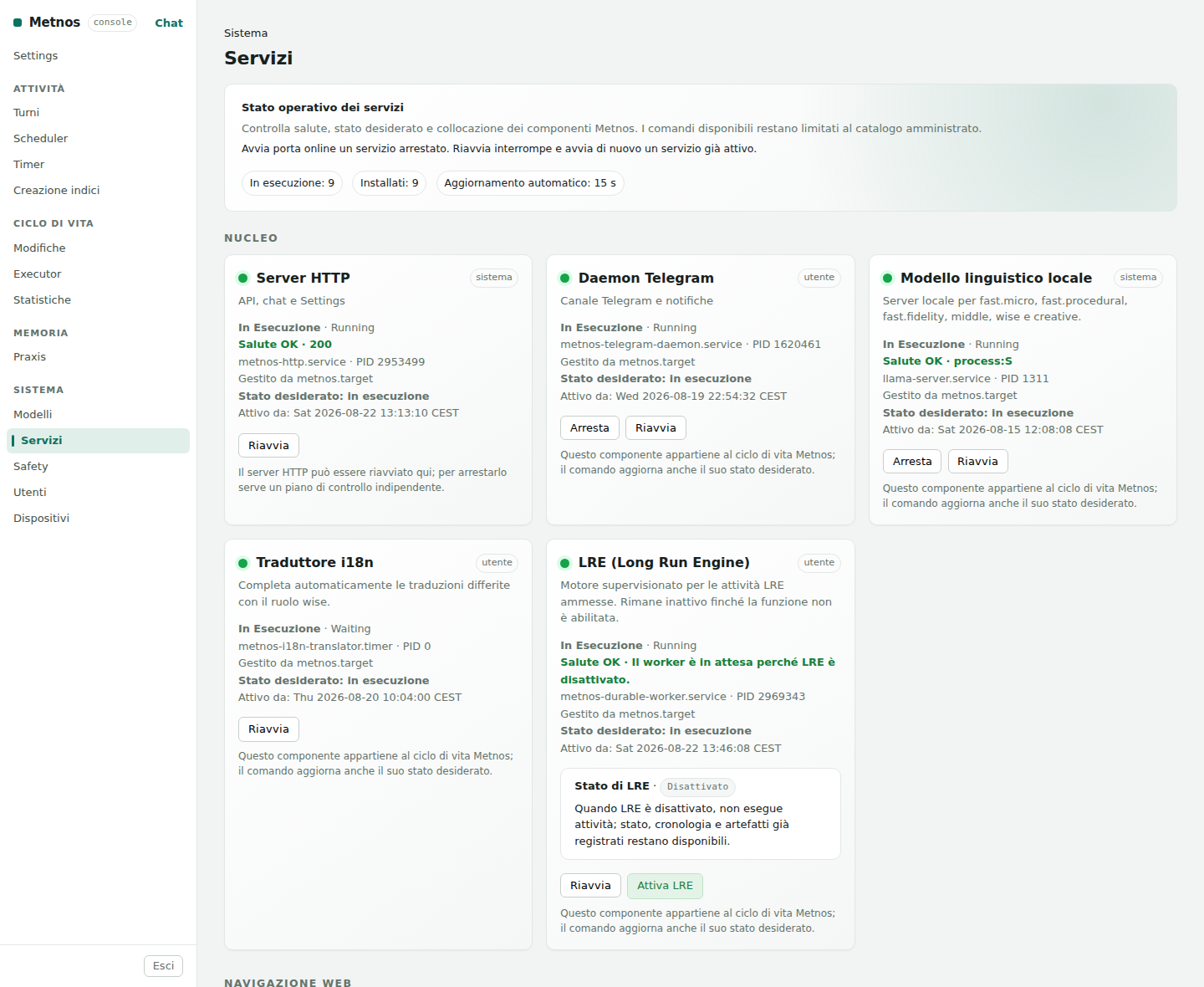
The Services page brings together the supervised components that make up a Metnos instance. For each component it reports process state, application health, desired state, and admitted controls. The catalog is closed: the interface cannot invoke arbitrary units or actions.
| Indicator | Meaning |
|---|---|
| Installed | The expected service unit is present; it need not be active. |
| Running | The supervisor sees the process or timer in its expected operational state. |
| Health | A component-specific check confirms that it responds or that its application state is coherent. |
| Desired state | Whether Metnos expects the component to remain running or stopped after reconciliation. |
An active process can be degraded when its application probe fails. Conversely, a waiting timer or an LRE worker with its feature disabled can be healthy precisely because it is waiting. Read the health explanation before acting; the status dot alone is not enough.
In Services → Periodic checks, administrators can choose how often to check and, if necessary, recover services: 30 minutes by default, with a range of 5 to 1,440 minutes. This persistent preference requires neither a restart nor recertification. A running check finishes normally; subsequent checks use the new interval. The first check starts three minutes after stack activation.
The interval changes scheduling only. Commands, limits, and security checks remain part of the signed program. Each full check releases its memory when it finishes; the small waiting process works independently of the web interface. Stopping the stack also stops periodic checks.
Start makes a stopped service operational. Stop interrupts an active service and updates its desired state when it belongs to the Metnos lifecycle. Restart stops and starts an active component. Available actions depend on the service, its placement, and the observed state. A missing control means that the action is unavailable in that context; it does not authorise a substitute external command.
The HTTP server is the control plane hosting this page. It can be restarted here, whereas stopping it requires an independent control path. The page refreshes periodically after an action. The result is verified only when effective state, health, and desired state converge.
LRE deliberately separates its supervised worker from feature activation. The worker may be running and healthy while waiting with LRE disabled. Enable LRE allows new workloads to be submitted. Disabling the feature prevents new activity without deleting previously recorded state, history, or artifacts. If the configuration is invalid, the gate remains closed.
The LRE card dot indicates feature availability: gray when disabled and that state is confirmed; green only when enabled and ready; amber during a state change or when availability is not verified; red for service failure or invalid configuration. The same information appears as text on the card: color is not the only signal. Process state, technical health and PID are under Technical details. Green does not mean a workload is progressing.
Before restarting. Check for active interactive turns and read any warning shown by the page. A restart is not a visual refresh: it actually interrupts the selected process.
The browser service uses Chromium by default. On Linux x86_64, an administrator can select Camoufox for the instance: it includes browser fingerprint masking and requires a dedicated installation. This choice does not guarantee access to every site or CAPTCHA resolution; an unresolved obstacle requires the user.
When the CAPTCHA panel appears in chat, complete the challenge in the page image, use Refresh when it changes, then press Resume. The panel supports clicking and scrolling, keeps the session for ten minutes and resumes the original request after checking the login. Cancel closes that session. OTP codes are requested in a separate form. When the CAPTCHA precedes the login form, Metnos fills the credentials after Resume. A black rectangle protects the field's contents; it does not mean the field is empty.
In two-step logins, the email field can also be identified by its form's title, in the page's language: the address need not contain the word “login”. An ordinary newsletter form is not sufficient; the credential destination must still be authorized. Any existing text is replaced; before submitting, Metnos checks that the field contains exactly the saved value.
After submission, Metnos waits for a verifiable outcome within its time budget. A disappearing form or a changed generic cookie does not end this wait. Credentials are not submitted again.
After Resume, the response keeps its own turn reference, the outcomes of the steps performed and any images. A successful login and an interrupted subsequent search remain distinguishable in the history.
To find all items, state what you are looking for, which filters apply and which data to show: for example “all 2026 invoices with their amounts”. Metnos follows relevant pages, archives and details even when a page only contains items outside the requested period. When returning to a section, it reads the current content and verifies links before exploring alternatives: an updated promotional card does not interrupt the search. Search has a budget of 96 actions and five active minutes, excluding time waiting for your input. If it reaches a limit, the result is marked as partial: the collection is not declared complete.
The message field and forms in chat follow the window width when you resize it, preserving the text you have already entered.
Camoufox also requires an explicit choice to allow WebSockets: these connections can reach destinations outside the hosts approved for ordinary navigation. The option is off by default; with Camoufox, the service stops if it has not been authorized. HTTP requests, credential origins and consent retain their controls. Changing the engine requires the normal authorized service restart.